
Meme template
Blank Sybau Meme Template
Make a Blank Sybau meme with MemeHub's free generator. This meme format is often used to represent ambiguity, lack of clarity, or something being difficult…
- Caption areas
- 1
- Image format
- 340 × 294
Free to try in your browser. Add text, adjust the layout, and download your meme.
Template images may be supplied through third-party sources. Check permission, attribution, and destination-platform rules before publishing. Report a rights or removal concern.
Related meme collections
How to use this meme template
Blank Sybau uses this visual format: A blurry, nondescript outdoor scene, possibly a parking lot or empty field, with some buildings in the background and trees on the left. The overall image is hazy and indistinct.
This meme format is often used to represent ambiguity, lack of clarity, or something being difficult to discern. It's frequently applied to situations where information is vague or a clear outcome is uncertain. Use it when a blurry joke needs a recognizable visual setup before the caption lands.
Caption structure: The caption should capture a sense of uncertainty or vagueness that aligns with the visual. There is only one caption slot for this template.
Good use cases include predicting market trends, evaluating a new product's potential, uncertain business outcomes, navigating complex regulations, company vision communication.
- Start with a specific situation that fits the blurry context.
- Keep the caption readable at phone size and leave the defining visual detail visible.
Good use cases
- predicting market trends
- evaluating a new product's potential
- uncertain business outcomes
- navigating complex regulations
- company vision communication
1. Open the template
Click “Use this template” to open it in MemeHub's online editor.
2. Write your joke
Replace the suggested text with your own setup, punchline, or reaction.
3. Download your meme
Export the finished image and share it with your audience.
More meme templates
Browse all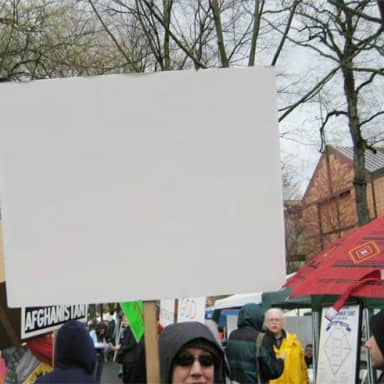


More meme-making guidance
Learn how to choose a format, structure the caption, and compare the visual grammar of different meme templates before you export.